How to Develop an AI Personal Trainer App
At Krootl, we love fitness apps. They’re a pretty common request we get from our clients, and at first glance, many of them may look similar. But once you get into the product logic, they can be very different.
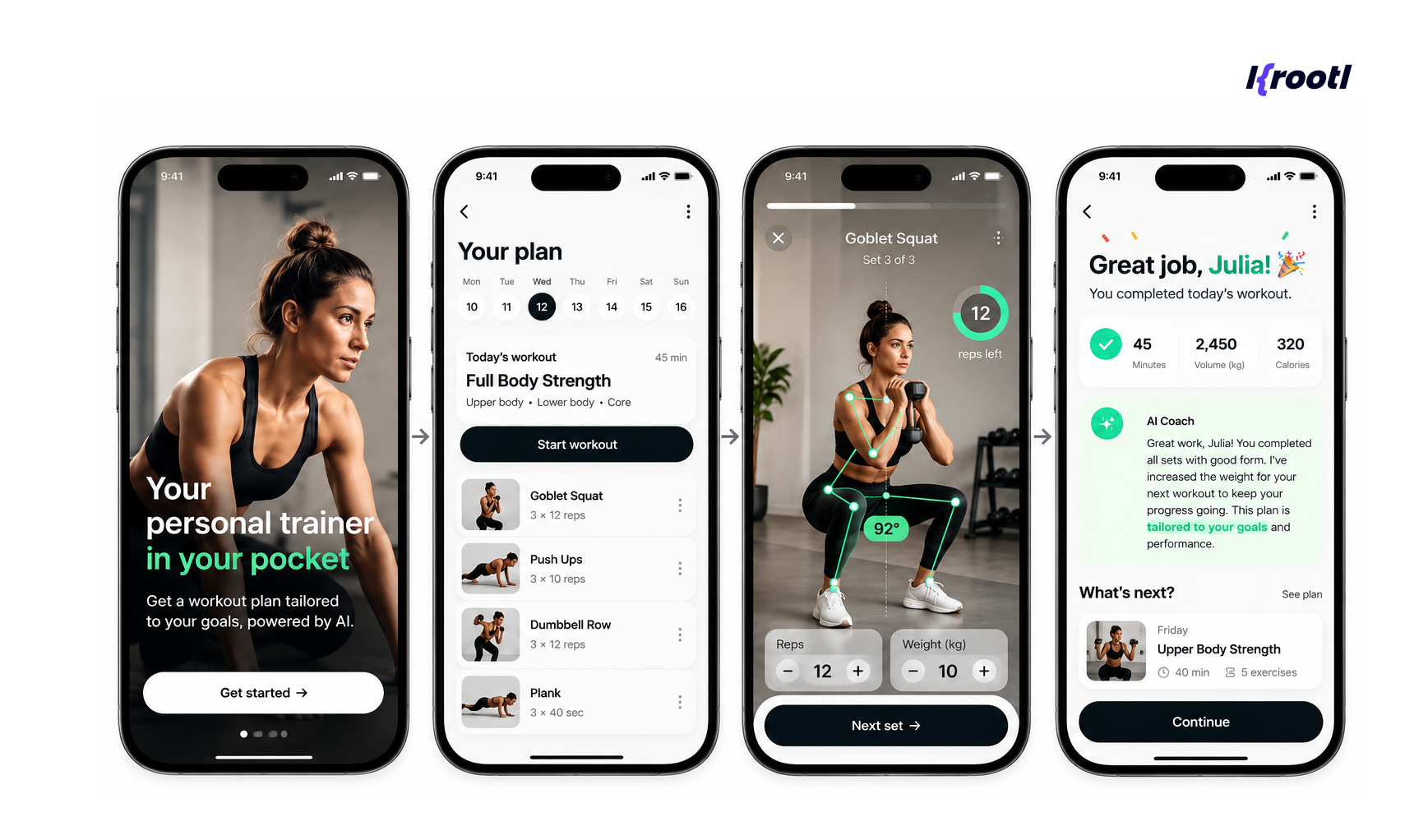
Yes, fitness apps used to be relatively predictable: choose a workout, follow the instructions, log the result, and come back tomorrow. But AI is changing that model. Instead of showing every user the same training program, an AI-powered workout app can build a plan around an individual’s goals, experience, available equipment, training history, and performance.
More advanced products can adjust the next workout based on completed sets, perceived difficulty, recovery data, or even information collected from wearable devices.
In other words, the product starts behaving less like a workout library and more like a digital personal trainer. But building one requires much more than connecting a mobile interface to an LLM.
We wrote this post specifically about AI workout app development: how these products work, what should be included in an MVP, where AI actually adds value, and what architecture and technology are needed to build one.
What Is an AI Workout App?
So, what’s behind an AI workout app? It’s a fitness application that uses user data and artificial intelligence to personalize training recommendations. And the key word here is personalize. A conventional workout app might offer a predefined “12-week strength program,” while an AI-powered product can create or modify that program based on information such as:
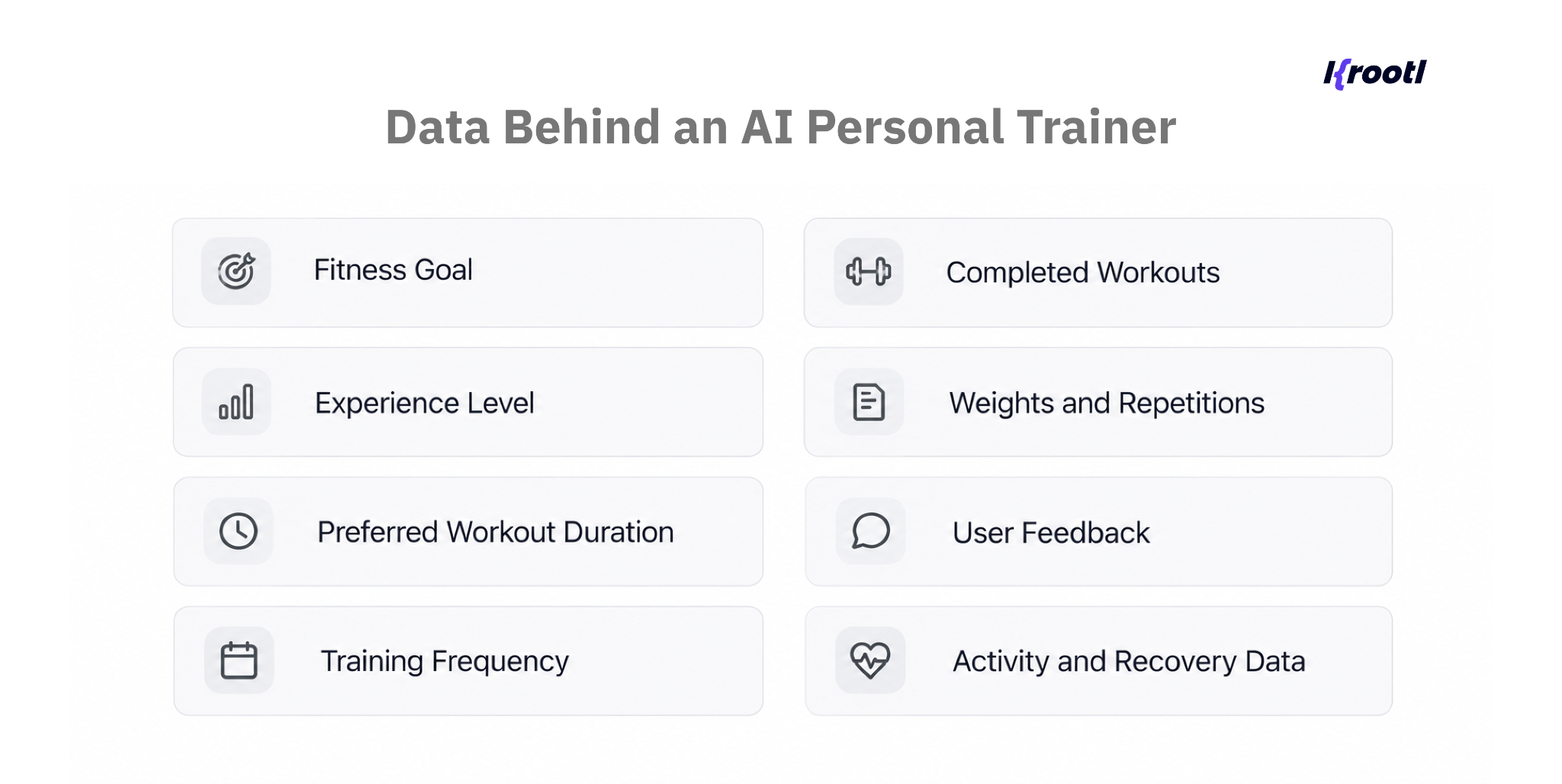
The complexity of the app can vary significantly. At the simplest level, AI might recommend workouts based on onboarding information. At a more advanced level, the system continuously evaluates performance and adapts future sessions.
This distinction is important for companies planning to develop a workout app. Adding an AI chatbot does not automatically make a fitness product intelligent. The real product value comes from connecting AI with structured workout logic and meaningful user data.
For a broader overview of fitness products, features, monetization, and development stages, see our fitness app development guide.
How an AI Personal Trainer Actually Works
If we had to explain how an AI personal trainer actually works in the simplest possible way, we’d describe it as a continuous feedback loop.
The user provides information. The system generates a suitable workout. The user completes it. The application collects the result. That information influences what happens next.
The basic flow looks like this:
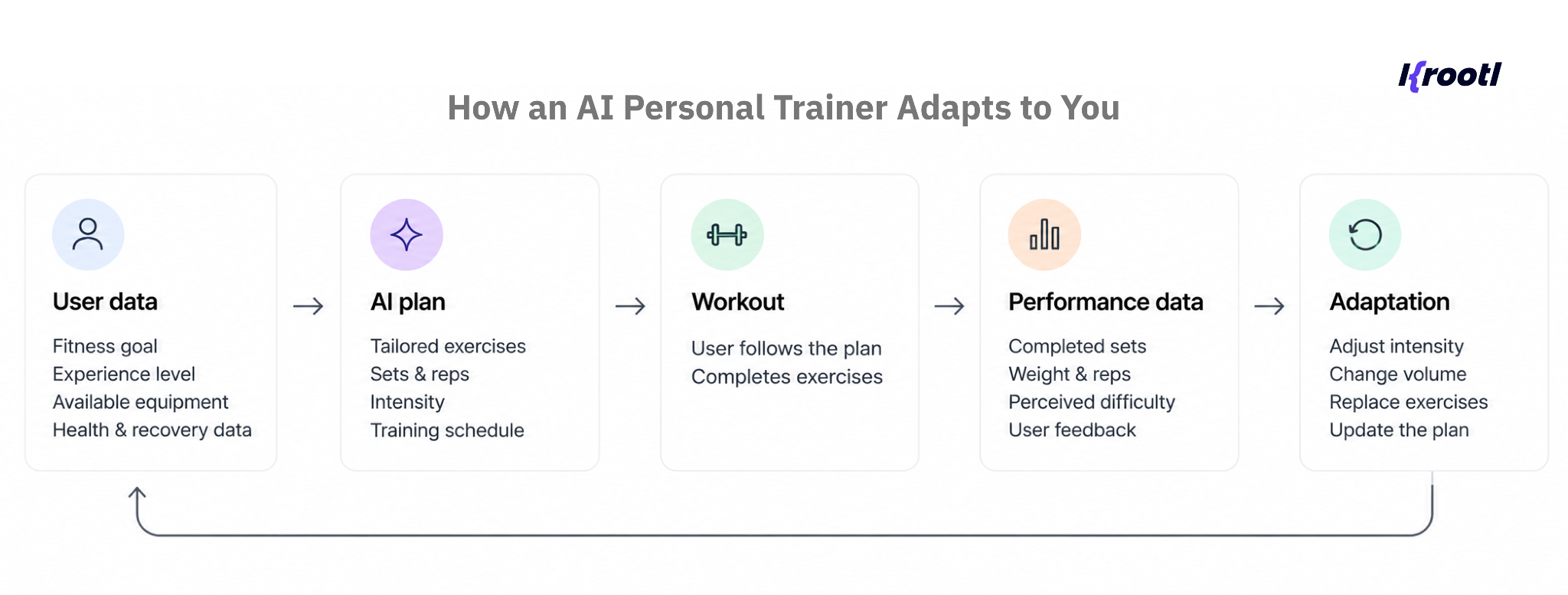
This architecture is very different from simply asking a language model to “generate a leg workout.” A reliable workout app needs several layers working together.
User Profile and Onboarding
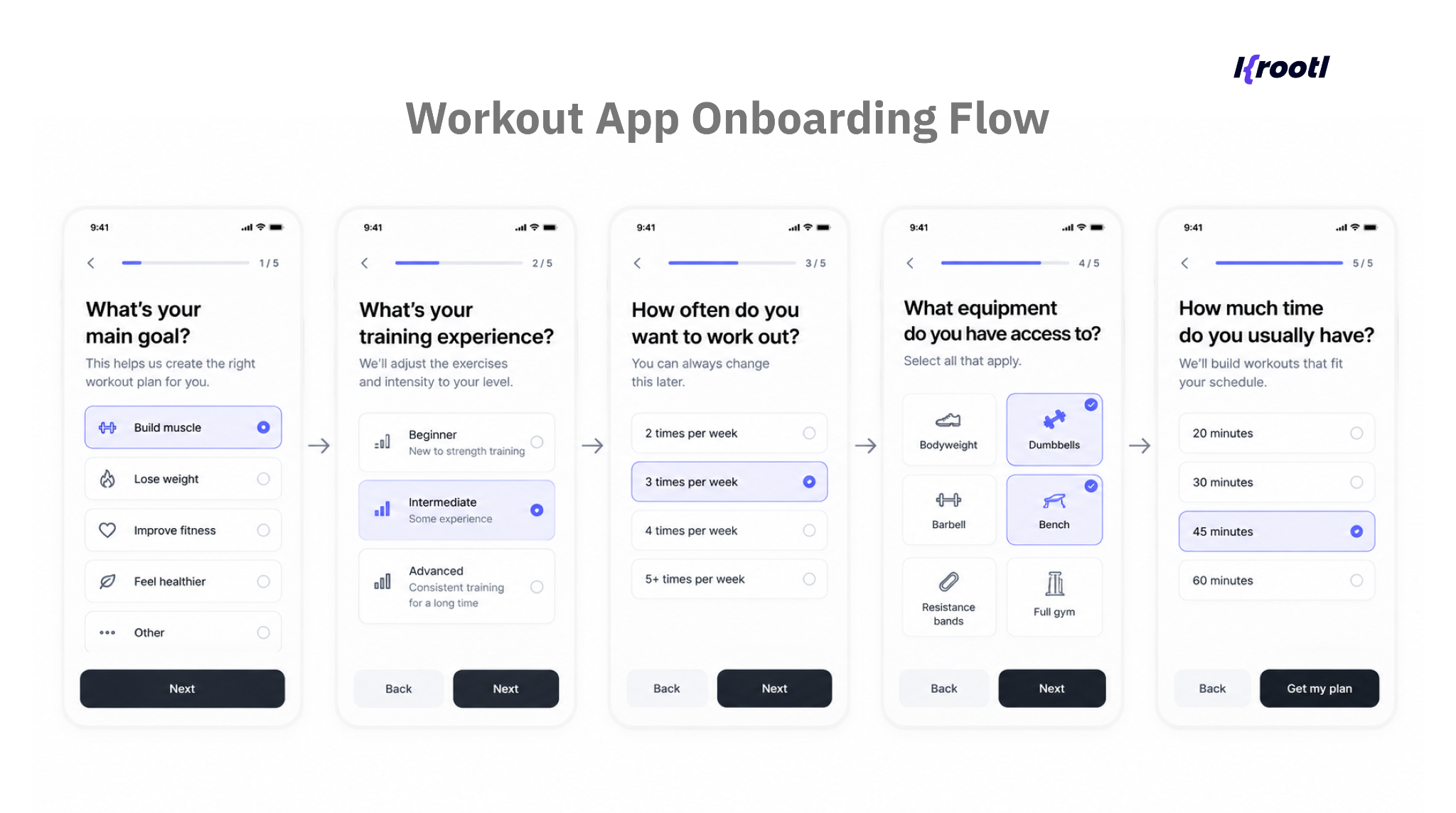
Good personalization starts with structured information. During onboarding, the app can collect the user's primary goal, training experience, preferred workout frequency, available equipment, typical workout duration, and exercise preferences.
For example:
Goal: build muscle
Level: intermediate
Schedule: 3 workouts per week
Equipment: dumbbells and bench
Duration: 45 minutes
This already gives the system boundaries within which it can create a program.
Over time, the initial profile becomes less important because the app starts collecting something much more valuable: actual behavioral and performance data.
Exercise and Workout Database
Behind the AI layer should be structured fitness data. Each exercise can contain attributes such as muscle group, movement type, equipment, difficulty, sets and repetitions, rest requirements, and alternative exercises.
This gives the system a controlled library from which workouts can be assembled. It also prevents one of the biggest mistakes in AI fitness app development: allowing a general-purpose language model to become the only source of workout logic.
AI is excellent at understanding requests, generating explanations, summarizing progress, and helping personalize experiences. But deterministic rules and structured data are still valuable when the application needs predictable behavior. The best architecture usually combines both.
Where AI Adds Real Value
What we’ve noticed is that AI can be useful across several parts of the workout experience, but not every feature needs it. The most useful applications tend to fall into four areas.
- Personalized Workout Generation
Instead of asking users to browse through hundreds of workouts, the app can generate a suitable session automatically.
A user could simply request:
30-minute upper-body workout, at home, dumbbells only.
The app then combines the user’s profile with its exercise database and training rules to create an appropriate session.
The user doesn’t have to scroll through dozens of options or figure out what to do next, because the workout is already built around their needs.
- Adaptive Training
Imagine that a user completes three sessions and consistently reports that a particular exercise feels easy. They also complete every prescribed repetition. The system can use those signals to adjust the next session by increasing resistance, repetitions, volume, or exercise difficulty.
However, the opposite can happen too. If the user repeatedly fails to complete a workout, reports excessive difficulty, or skips certain exercises, the program can be adjusted rather than blindly following the original schedule.
The training plan therefore becomes dynamic instead of static.
- Conversational AI Coach
An AI coach provides another useful interface between the user and the workout system.
Instead of navigating through settings, a user might simply ask:
Can I replace this exercise?
I only have 20 minutes today. Can you shorten my workout?
Why am I doing fewer repetitions this week?
The AI layer interprets the request while the application uses its own data and workout logic to determine the appropriate response.
This is one area where LLMs can create a significantly more natural experience than conventional menus and filters.
- Progress Analysis
Think about how much fitness data we already generate every day. You wear a smartwatch or a ring, complete a workout, track your sleep or recovery, and suddenly you have dozens of metrics. But having the data doesn’t necessarily mean knowing what to do with it.
This is where AI can be genuinely useful. Instead of simply showing numbers and charts, it can analyze training history, identify meaningful patterns, and turn them into actionable insights.
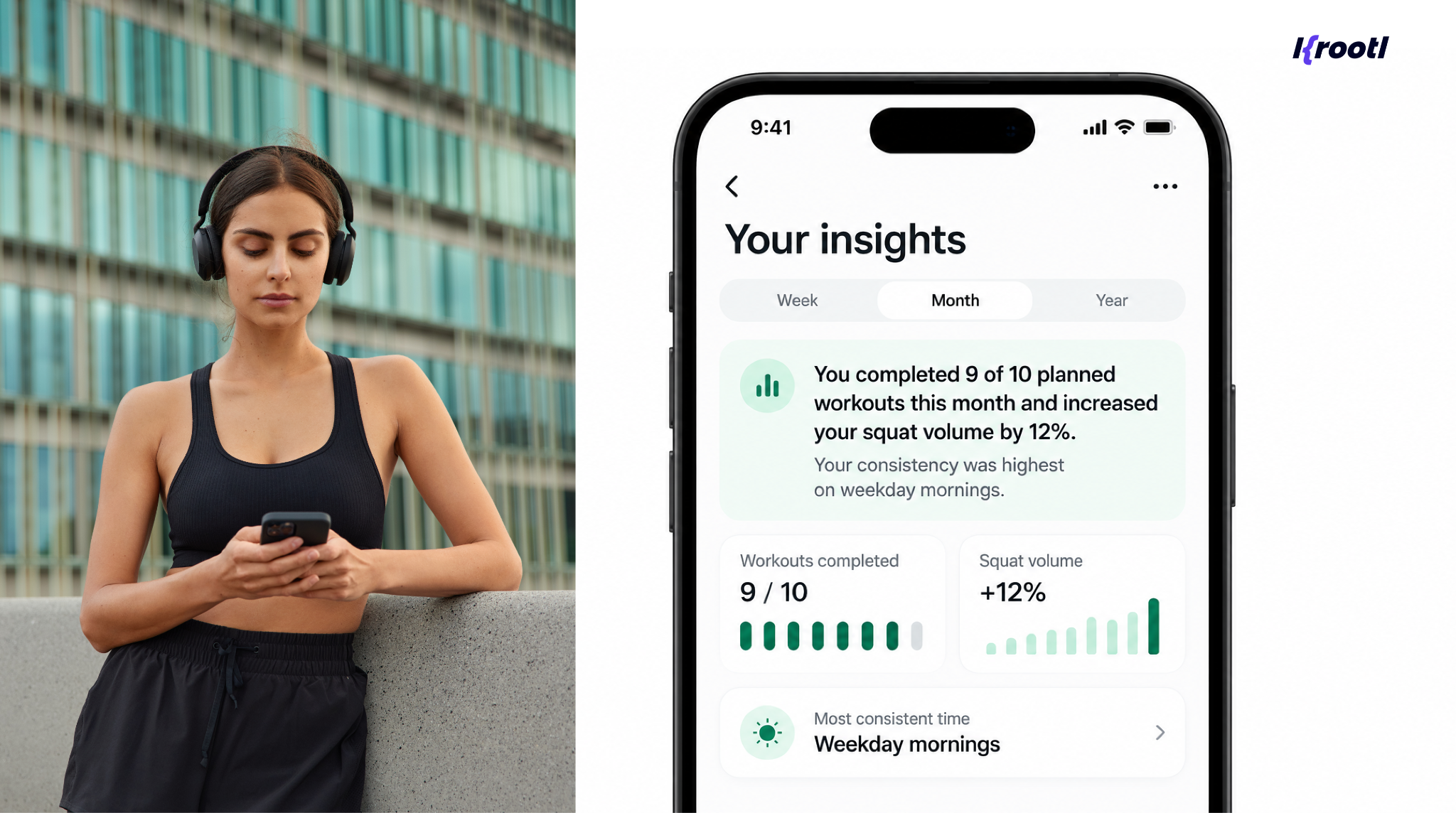
The important part isn't simply generating text. It is selecting useful information from actual product data and communicating it clearly.
This approach is similar to the broader use of AI in mobile applications, where AI becomes valuable when it helps users understand information or make the next interaction easier. See our guide to AI in mobile apps for more examples.
Adding Wearable Data
Wearables can take personalization one step further. And from what we’ve seen when working with fitness and wellness products, this is where things get especially interesting: the app is no longer limited to the data users enter manually.
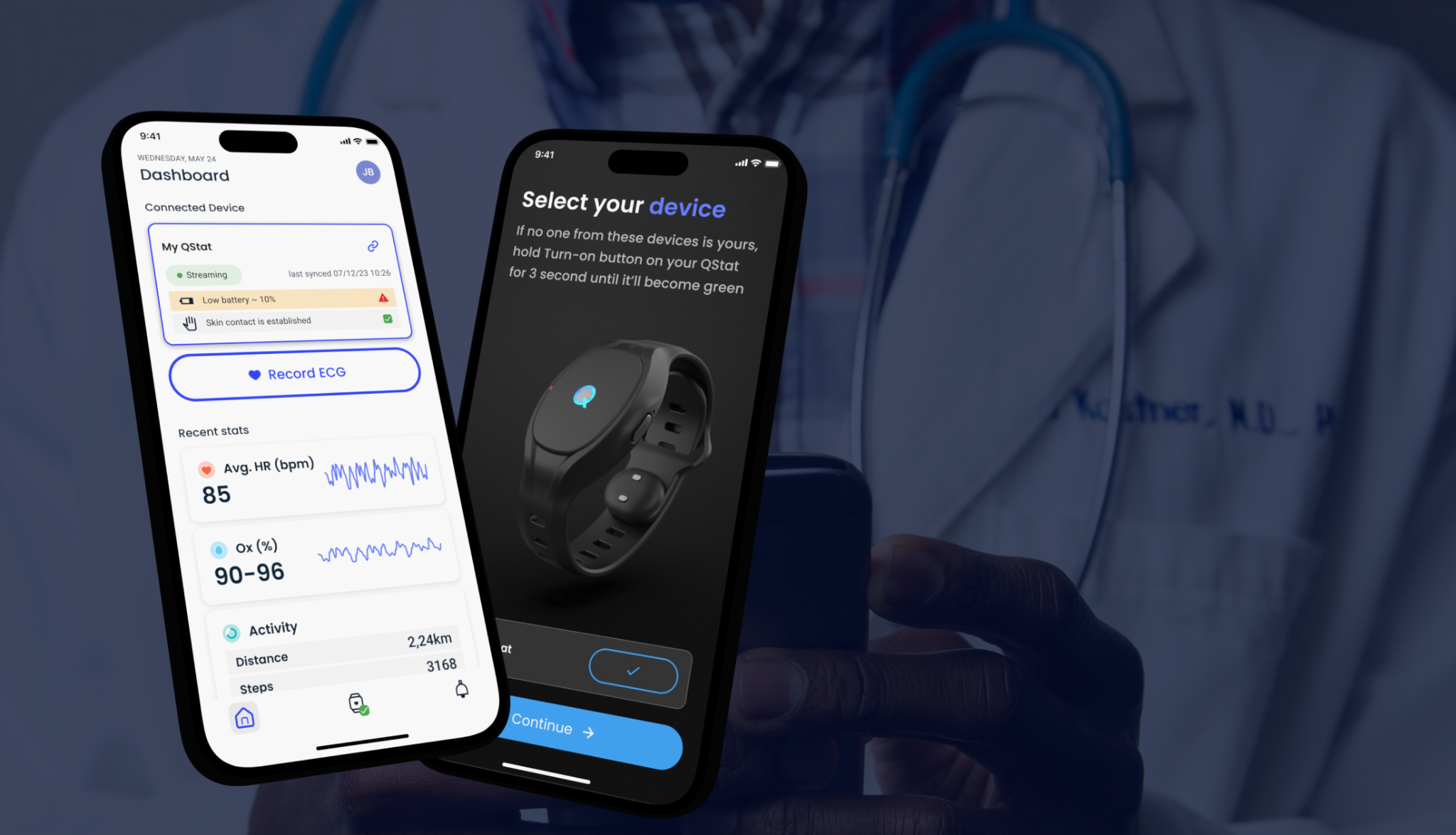
Depending on the product, workout apps can pull data from Apple Health or Health Connect, as well as devices like Apple Watch, Garmin, WHOOP, or Oura Ring. This can include activity levels, workout history, heart rate, sleep, and recovery-related metrics.
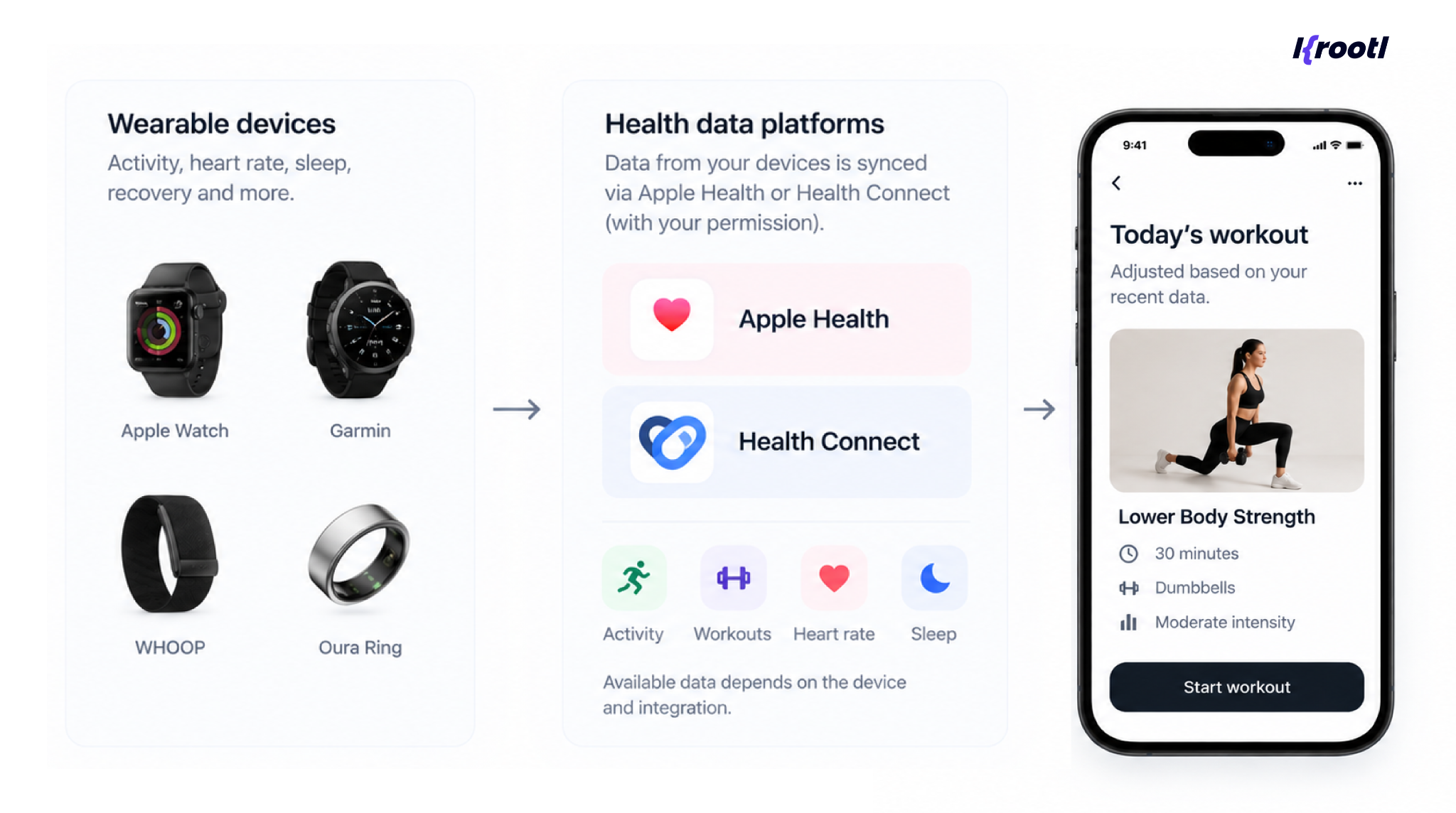
Here’s a simple example. You planned an intense workout for the morning, but your wearable shows that you didn’t sleep well, your recovery is lower than usual, and you were particularly active the day before.
Instead of simply following the original plan, the app could use this data to suggest a lighter workout or reduce the intensity. That’s when personalization starts to feel genuinely personal.
But there’s one thing to keep in mind - wearable data isn’t always perfect. Different devices calculate metrics differently, and some data may be missing or incomplete. It’s also important not to treat data from consumer wearables as clinical information.
For teams considering this functionality, we cover the technical side in more detail in our wearable app development with Flutter guide.
Computer Vision and Exercise Form Analysis
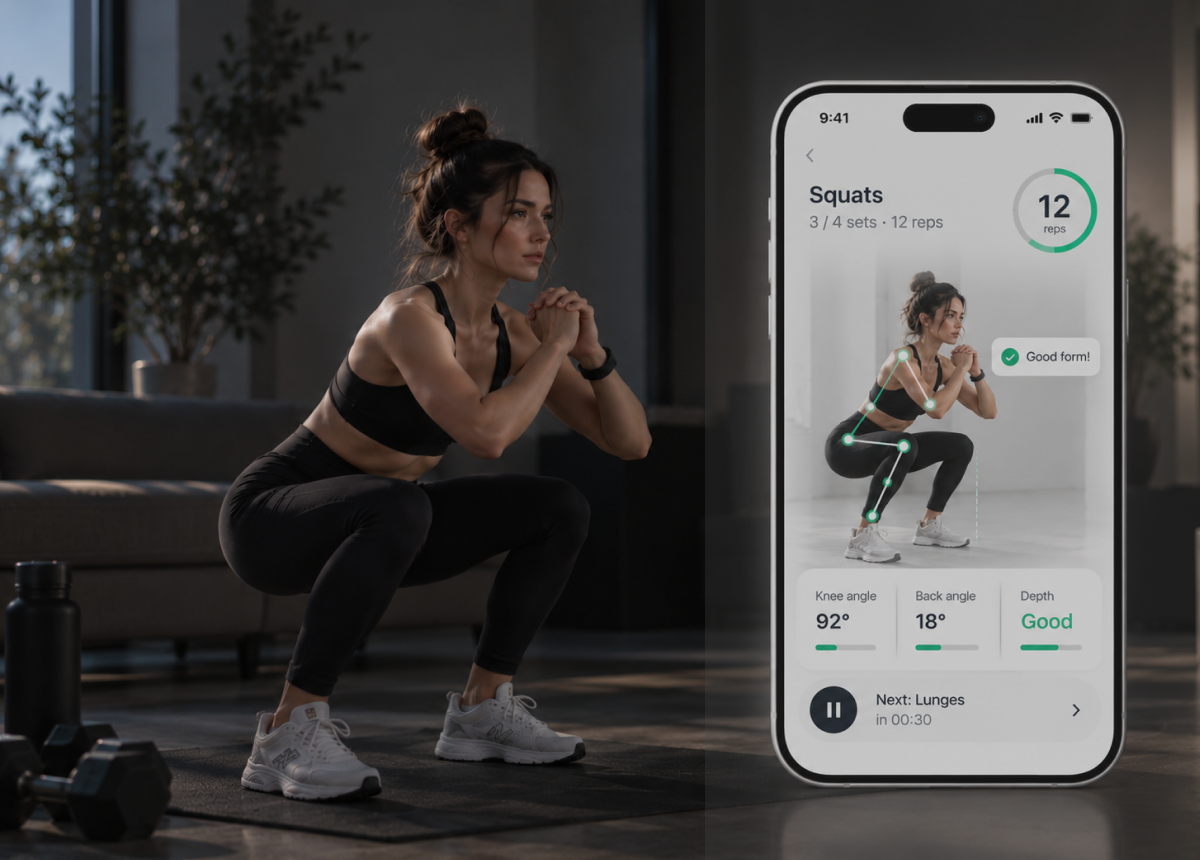
A more advanced AI personal trainer can go one step further and use the smartphone camera to analyze how a user moves during a workout.
Take a squat, for example. Computer vision can track key points of the body, such as the hips, knees, ankles, and upper body, and analyze how their position changes throughout the movement.
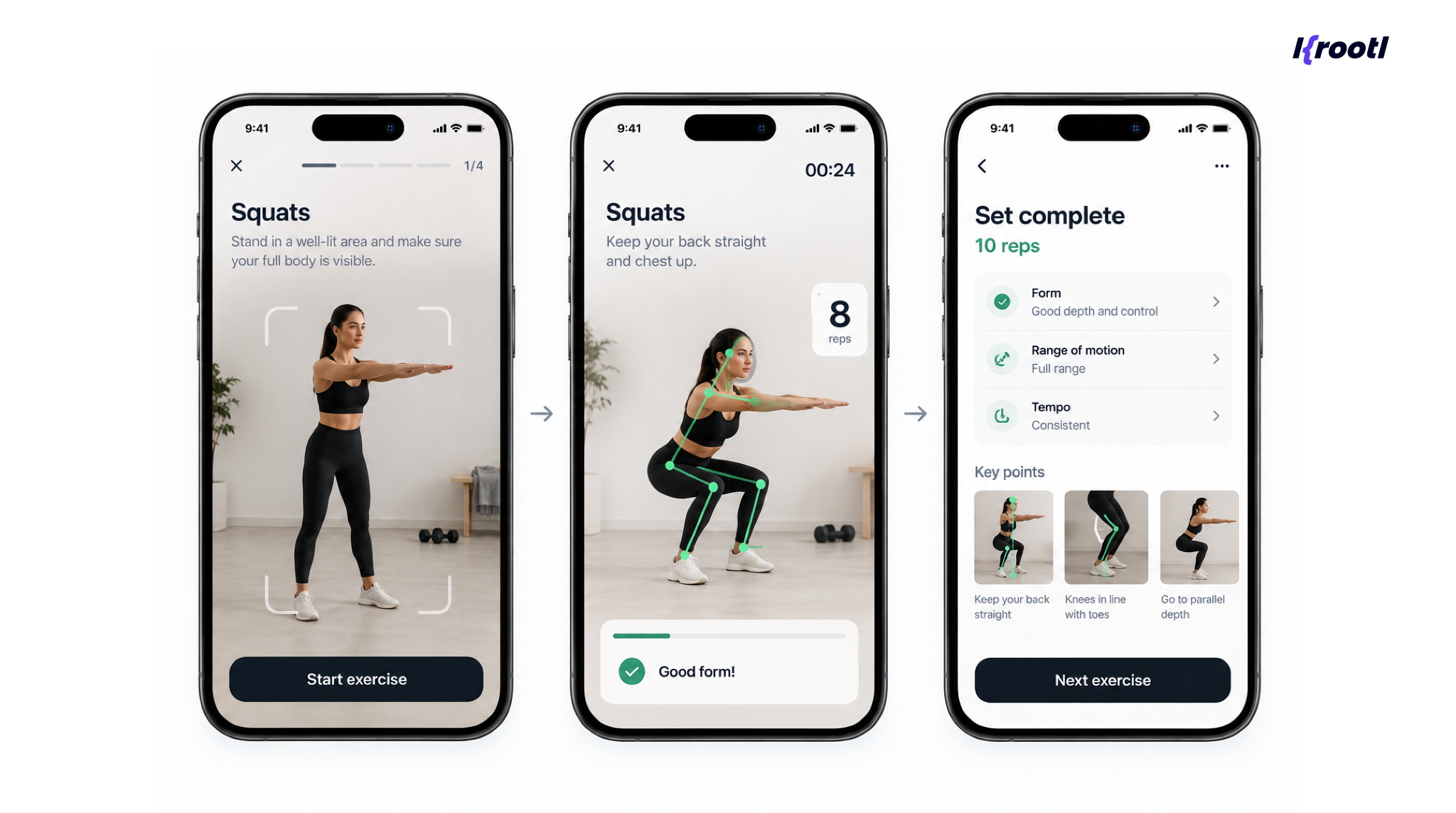
This opens the door to features like repetition counting, movement tracking, range-of-motion analysis, and even real-time feedback on exercise form.
But this is also where workout app development gets significantly more complex. The system needs to work with different camera angles, lighting conditions, body types, devices, and exercise variations. And when an app starts giving feedback on someone’s technique, accuracy becomes especially important. Bad feedback can quickly make users lose trust in the product.
That’s why, for most startups, we would consider computer vision a later-stage feature rather than something to include in the first MVP.
What Should Be Included in an AI Workout App MVP?
One of the easiest ways to overspend on an AI fitness product is to attempt everything at launch.
A focused MVP could include:
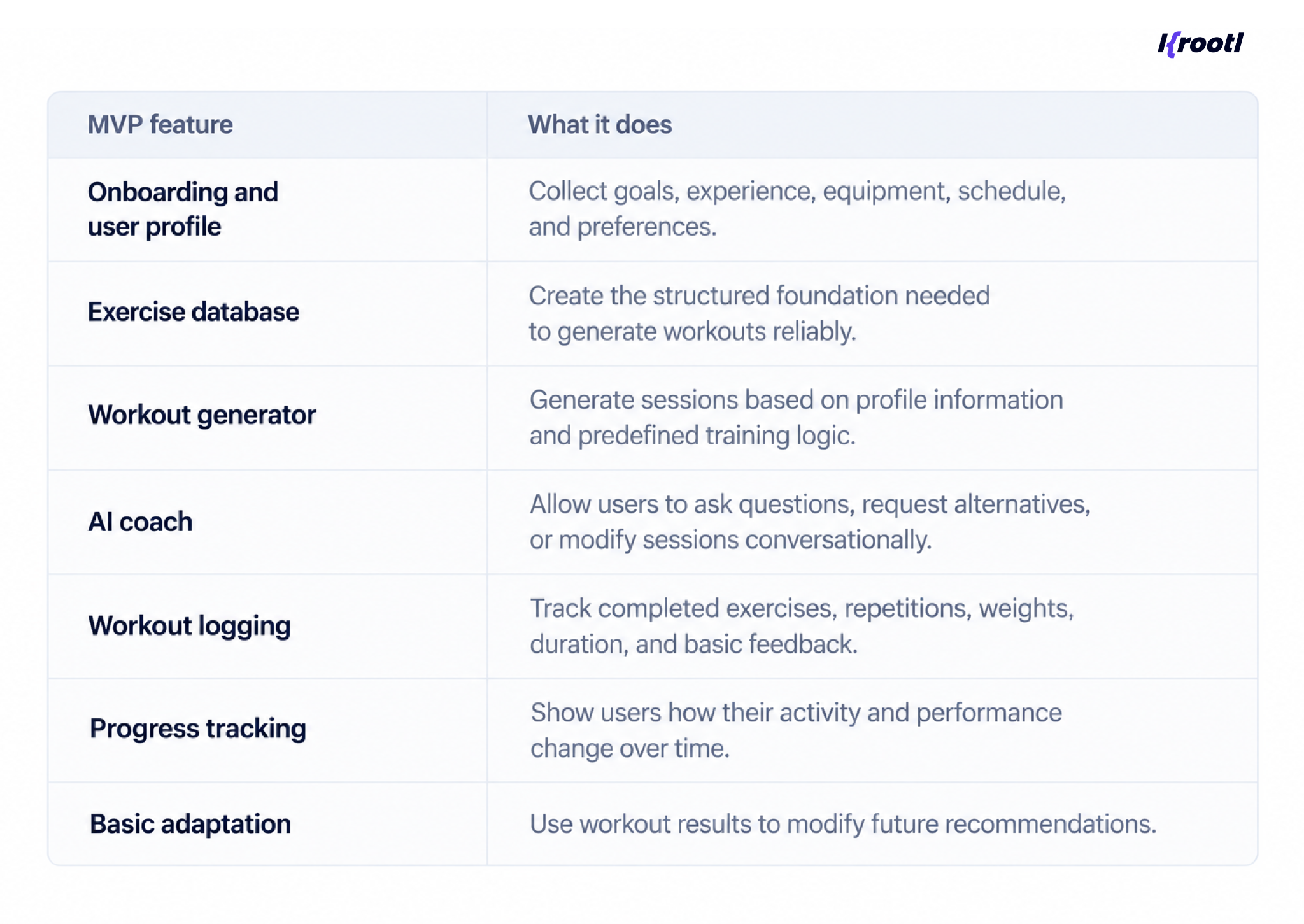
This is enough to test the core hypothesis: will users value a training program that changes with them?
Wearable integrations, advanced recovery algorithms, social functionality, sophisticated gamification, and computer vision can follow once real usage validates the concept.
Technology Stack for AI Workout App Development
There is no universal technology stack that works for every fitness product. At Krootl, we choose it based on what the product actually needs to do, both at launch and as it grows.
For mobile development, Flutter is usually our preferred choice, especially when a product needs both iOS and Android apps. It allows us to work with a shared codebase while still integrating native functionality when needed. For fitness products, this becomes particularly important when working with wearables, health data, camera features, notifications, or subscriptions.
The backend is where the choice becomes much more project-specific. Depending on the product, we may use Python with FastAPI or Django, Node.js, PostgreSQL, Firebase, Supabase, or AWS. A relatively simple MVP and a platform expected to handle complex personalization, large amounts of workout data, and multiple integrations may require very different setups.
The same applies to AI. Sometimes an LLM API is enough for an AI coach or conversational features. In other cases, we combine it with recommendation logic, our own algorithms, or machine-learning and computer-vision models.
So, there is no single stack we recommend to every client. What matters more is choosing the simplest architecture that supports the product today without limiting what it can become tomorrow.
And one decision we pay particular attention to is what AI should actually control and what should remain part of the application logic. Not every decision needs AI. Keeping that separation clear makes the product easier to test, maintain, and improve.
How Much Does It Cost to Develop an AI Workout App?
The short answer is that a focused AI workout MVP can start at around $25,000 - $40,000, while more advanced products can range from $40,000 to $100,000+, depending on the level of personalization, integrations, and AI functionality.
The difference mostly comes down to how intelligent and connected the first version needs to be.
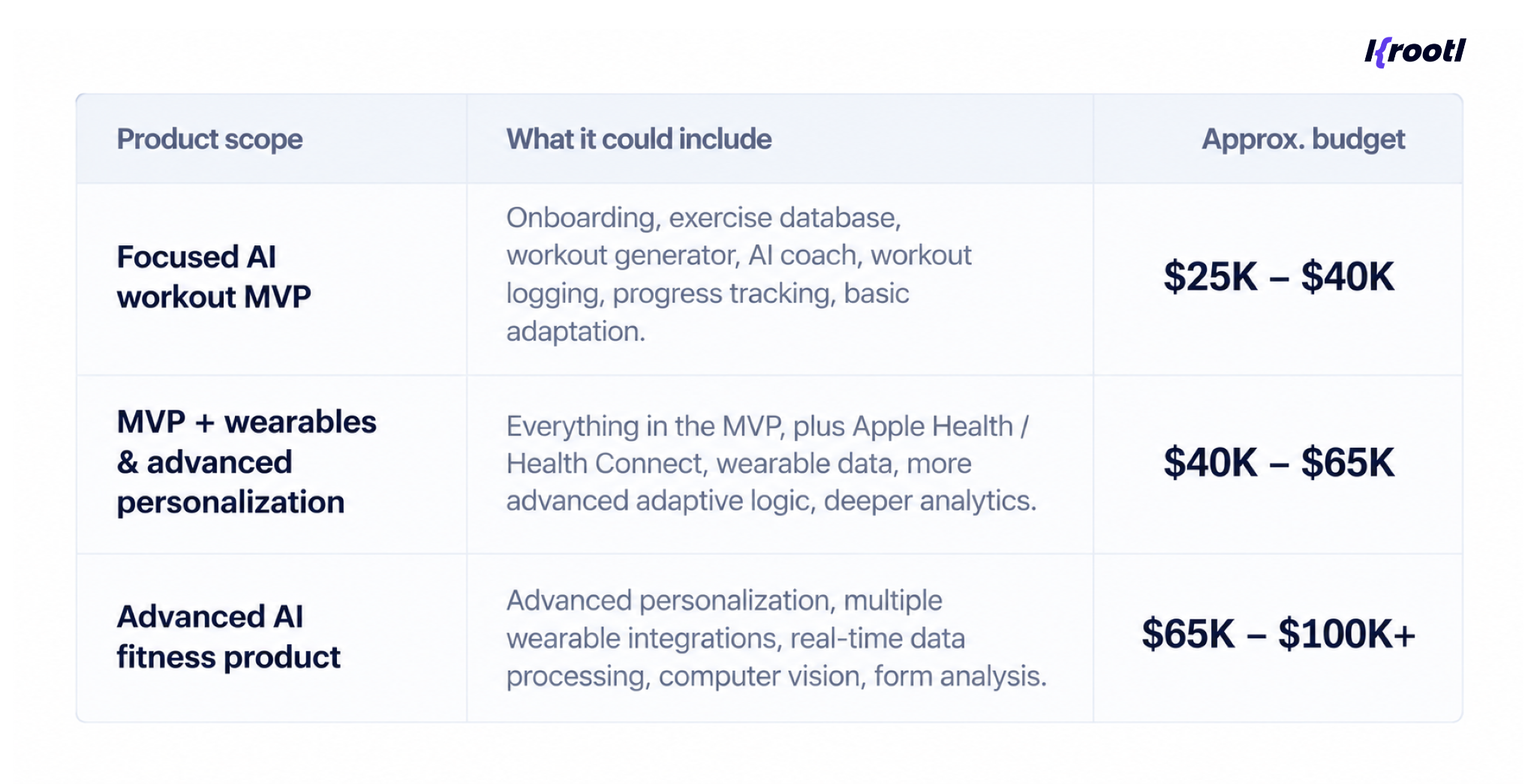
These are not fixed packages. We use ranges because two products that look similar on paper can require very different amounts of work once we get into the workout logic, integrations, data flows, and AI behavior.
The cost usually comes down to a few key things: how complex the mobile app is, what the backend needs to handle, and how much AI and personalization are involved.
Wearable integrations, video content, computer vision, subscriptions, custom design, and testing across different devices can increase the budget further.
There is also one ongoing cost that traditional workout apps may not have: AI inference. Every request to an external AI model has a cost, so we usually think about model usage, context size, caching, and whether some decisions can be handled more efficiently by conventional application logic.
For a broader look at mobile development budgets and what goes into them, see our Flutter app development cost guide.
Choosing the Right Workout App Developers
Building an AI workout product requires a slightly different skill set from building a simple content-based fitness application.
The development team needs to understand mobile development and backend architecture, but also AI integration, structured data, analytics, third-party APIs, and potentially wearable or computer-vision technologies.
Experienced fitness app developers should also be able to challenge the initial feature list. For example, a startup may arrive with plans for real-time camera analysis, six wearable integrations, an AI coach, social challenges, and nutrition tracking. The technically correct answer isn't necessarily to build all of them.
A better workout app development strategy may be to identify the smallest product that proves users value personalized training, then add complexity based on actual behavior.
This reduces initial development risk and gives the product team real data for deciding what to build next.
Wrapping Up
Think of AI as a boost to your fitness product, not something the product has to be built around.
Used in the right places, it can make a workout app much more personal. It can help adapt workouts, make sense of user data, simplify interactions, and give users more relevant recommendations. But that doesn’t mean every feature needs AI.
Sometimes structured logic and a well-designed user experience will do the job better, faster, and at a lower cost.
That’s why, when we work on AI products, we first look at where AI can actually improve the user experience and where conventional application logic makes more sense.
If you’re planning to develop a workout app, start with the product itself. Define what users need, what the app should learn from their behavior, and where personalization would genuinely make the experience better. And only then decide where AI fits in.
Planning an AI Workout App?
At Krootl, we help startups and businesses turn fitness product ideas into working mobile applications, from product discovery and UX/UI to Flutter development, backend architecture, AI integrations, testing, and launch.
Have an AI fitness app idea in mind? Tell us what you want to build, and we’ll help you define the right MVP, choose where AI actually adds value, and estimate what it will take to bring it to market.
FAQ
How much does it cost to develop an AI workout app?
A focused AI workout MVP can typically start at around $25,000- $40,000. Products with wearable integrations, more advanced personalization, real-time data processing, or computer vision can range from $40,000 to $100,000+, depending on the scope.
How long does it take to build an AI personal trainer app?
A focused MVP can usually be developed in around 2–5 months. More advanced products may take longer, especially if they include wearable integrations, custom AI logic, computer vision, or complex backend infrastructure.
Do you need custom AI models to build an AI fitness app?
Not necessarily. For many MVPs, existing LLM APIs combined with structured workout data and application logic are enough. Custom machine-learning or computer-vision models usually make sense when the product requires more specialized functionality that existing AI services cannot provide.