Changing the team behind an existing application can feel considerably riskier than hiring a development company for a new product. Your app is already live, with users, integrations, infrastructure, and years of technical decisions behind it. And if you're also considering Flutter app development as part of a technology migration, the decision becomes even more complex.
But changing development teams doesn't necessarily mean starting over.
A well-planned software project handover gives the incoming team a chance to understand what already works, identify technical debt, and decide what should be kept, improved, migrated, or rebuilt. In this guide, we'll look at how to hand over an existing app safely, what the new development team should audit, and when a migration to Flutter actually makes sense.
When Does It Make Sense to Change Your App Development Team?
There is no single reason companies change software development partners. Sometimes the relationship simply stops working. In other cases, the product has grown beyond the technical decisions made when it was first launched.
Some warning signs are relatively easy to spot:
- releases are getting slower while the backlog keeps growing;
- new features regularly create bugs elsewhere in the application;
- communication has become difficult or you have little visibility into development;
- the current vendor cannot provide reliable maintenance and support;
- your roadmap requires expertise the existing team doesn't have;
- technical debt is making seemingly simple changes expensive;
- maintaining separate iOS and Android applications is taking too many resources.
None of these automatically means the application needs to be rebuilt. Changing the development team and changing the technology are two separate decisions. The first job of the incoming team should be to understand the product well enough to tell the difference.
Before the Handover: Audit What You Actually Have
One of the biggest mistakes in a software project handover is treating the existing application like a new project. A new team shouldn't start by rewriting screens or adding features. It should start by understanding the product it is inheriting.
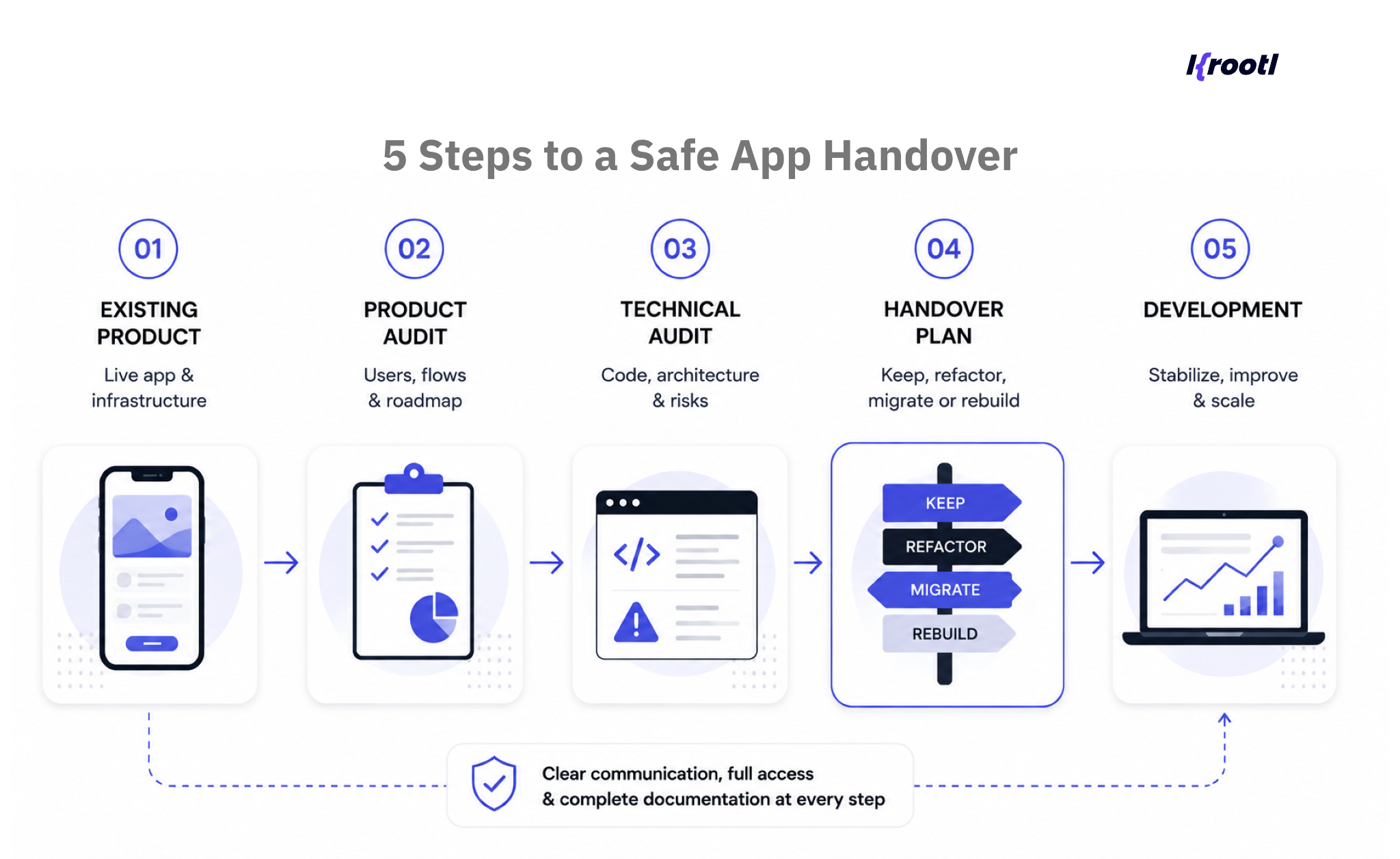
Product Audit
The team needs to understand how the application is used today: its core user journeys, business-critical functionality, analytics, known issues, backlog, and future roadmap. This context matters because technically imperfect code supporting an important working feature may deserve a very different priority from technically elegant functionality nobody uses.
Technical Audit
Next comes the codebase and architecture. The incoming engineers should review code quality, dependencies, backend architecture, third-party integrations, security, performance, automated tests, CI/CD, known technical debt, and how production releases currently work.
The goal isn't to produce a long list of everything that could theoretically be improved. It is to identify what creates actual product or business risk and what could prevent the next stage of development.
Infrastructure and Ownership Audit
Ownership is just as important as code quality. Make sure your company controls, or can obtain access to, the repositories, cloud infrastructure, databases, domains, analytics, Apple and Google developer accounts, payment services, Firebase projects, API credentials, and other third-party systems the application depends on.
App Handover Checklist: What Your New Development Team Needs
A smooth app handover is much easier when the incoming team receives the product as a system rather than a folder of source code. At minimum, prepare:
- Code: repositories, active branches, build instructions, dependency information, and release history.
- Infrastructure: hosting and cloud accounts, databases, environments, CI/CD configuration, monitoring, and backups.
- Product information: requirements, roadmap, backlog, analytics, user flows, and known issues.
- Design: Figma or other source files, assets, UI kit, and design system if one exists.
- Accounts and integrations: App Store Connect, Google Play Console, Firebase, payment providers, analytics tools, email services, and third-party APIs.
- Technical documentation: API documentation, architecture diagrams, deployment instructions, test cases, and README files.
- Knowledge: known technical debt, workarounds, release procedures, and any decisions that aren't obvious from the code itself.
When possible, arrange a knowledge-transfer session between the previous and incoming development teams. A few hours with engineers who know why certain decisions were made can save days of reverse engineering.
What if the previous development company doesn't cooperate?
An imperfect handover doesn't necessarily make a takeover impossible. Documentation, test cases, user stories, and even parts of the design can often be reconstructed by examining a live product and working with the client team.
Missing ownership is more serious. If you cannot obtain the source code, production database, or access to critical infrastructure, parts of the application may have to be developed from scratch. This is why checking ownership and access should happen before the previous vendor relationship ends whenever possible.
Keep the Existing Stack, Migrate the App, or Rebuild From Scratch?
Once the audit is complete, the incoming team can answer the question that matters: how much of the existing product is worth keeping? There are usually three realistic paths.
Keep and Improve
If the codebase is maintainable, the architecture still supports the roadmap, and technical debt is manageable, keeping the existing technology is usually the least disruptive option. The new team can stabilize the product, improve weak areas, and continue feature development without introducing migration risk unnecessarily.
Technology Migration
A technology migration becomes worth considering when the product works but its current stack is creating a growing constraint. Examples include expensive maintenance, outdated dependencies, difficulty hiring engineers, duplicated development across platforms, or an architecture that makes releases unnecessarily slow.
Migration can be gradual. You don't always need to replace an entire application in a single release.
Rebuild the Application
Developing the application from scratch may make sense when the existing foundation is fundamentally unsuitable: severe technical debt, an unsupported technology stack, inaccessible source code, or a major product redesign that would require replacing most of the existing system anyway.
But a rebuild should be the result of an audit, not the incoming team's preference.
A new development team should not recommend rewriting your application simply because they would have chosen a different technology.
Already have an app, but not sure whether to keep the current stack?
We can review your existing product and codebase, and help you understand whether it makes more sense to keep, refactor, migrate, or rebuild.
When Does Migration to Flutter Make Sense?
For companies maintaining separate native iOS and Android applications, changing development teams can also be a useful moment to evaluate a migration to Flutter.
Flutter uses a shared codebase across platforms, which can reduce duplicated development and make it easier to keep features and releases aligned. A business might consider migrating an existing app to Flutter when:
- separate iOS and Android teams are becoming expensive to maintain;
- features routinely arrive on one platform before the other;
- the product requires frequent iterations across both platforms;
- UI consistency is difficult to maintain;
- the roadmap requires faster cross-platform releases;
- the current mobile architecture is already due for significant modernization.
That doesn't mean every existing application should migrate to Flutter. Products that depend heavily on highly specialized platform-specific functionality may still benefit from native development, while others can use a hybrid approach.
This flexibility matters in real products. In Krootl's Astrolabium publishing app, for example, Flutter was used for the cross-platform application while complex features including file encryption, the audiobook player, and the e-book reader were implemented at the native iOS and Android levels. The architecture allowed shared Flutter code where it made sense without forcing non-trivial platform functionality into the same approach.
If you're evaluating the business case for the transition as well as the technical one, our guide to Flutter app development costs in 2026 explains how product scope, architecture, backend complexity, and team setup affect the overall budget.
The question therefore isn't simply, “Can we migrate to Flutter?” It is what do we gain by migrating, what should remain untouched, and does the business case justify the transition?
How to Migrate an Existing App to Flutter Without Rebuilding Everything at Once
Migration to Flutter doesn't always require a big-bang rewrite followed by one risky launch day. Depending on the architecture of the existing application, migration can be planned in stages.
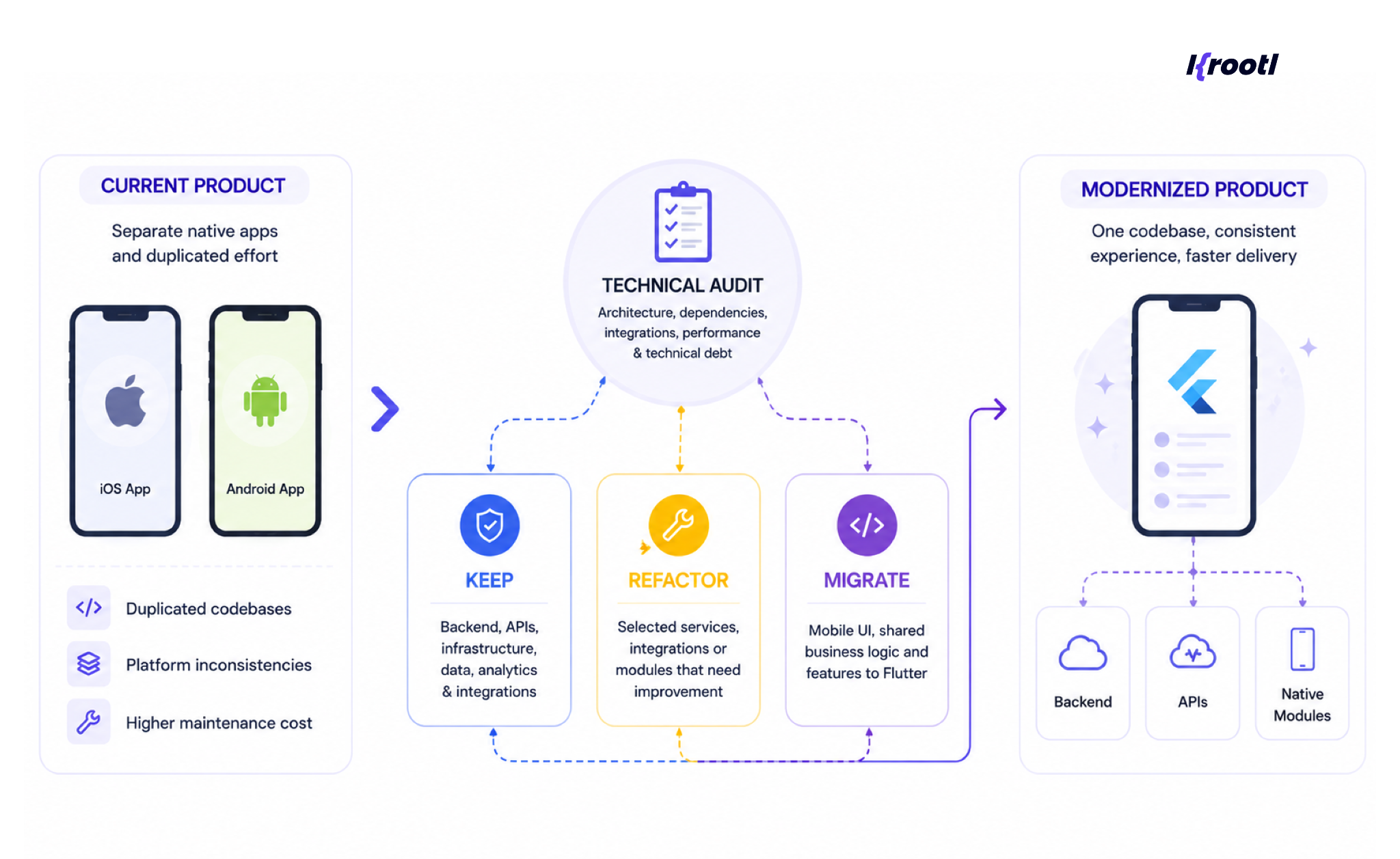
A practical process looks like this:
- Audit the current application. Understand the architecture, dependencies, integrations, performance issues, and technical debt.
- Define migration goals. Be specific about what the migration is expected to improve: development speed, maintenance cost, platform consistency, performance, or future scalability.
- Identify technical boundaries. Decide which functionality can move to Flutter, what backend services can remain unchanged, and where native modules may still be appropriate.
- Prioritize the migration. Start with areas that offer meaningful value without putting critical product flows at unnecessary risk.
- Test against the existing product. Functional behavior, integrations, analytics, accessibility, performance, and platform-specific scenarios all need to be verified.
- Release and continue iteratively. Where the architecture allows it, move functionality progressively rather than treating technology migration as an all-or-nothing event.
For an existing business, this is often more practical than stopping product development for months while a second application is developed from scratch.
What Should the First 30 Days With a New Development Team Look Like?
The exact timeline depends on the size and condition of the product, but the first month should be more structured than “here's the repository – start coding.”
Week 1: Access and knowledge transfer. Transfer repositories, infrastructure, documentation, accounts, and product context. If possible, involve the previous team.
Week 2: Product and technical assessment. The incoming team reviews the architecture and codebase, runs the application locally, checks environments and integrations, and identifies immediate risks.
Week 3: Stabilization and planning. Critical issues are prioritized, technical debt is separated from lower-priority improvements, and the next development roadmap is agreed.
Week 4: Controlled development. The team starts with a manageable feature, fix, or release cycle. This validates not only the codebase but also the new workflow, communication, QA, and deployment process.
For larger or poorly documented applications, the audit can take longer. That's preferable to rushing into development with assumptions that later become expensive.
Taking Over an Existing Product: How We Approach It at Krootl
At Krootl, we work with products at different stages: from applications developed from scratch to existing products that need a new development team, modernization, ongoing support, or migration to Flutter.
Flutter is one of our core technologies, but it isn't the only technology we use. Our projects combine Flutter with technologies such as Python, Firebase, PostgreSQL, React, and native iOS and Android components depending on the product requirements. For Cooker's delivery platform, for example, the solution combined Flutter customer and courier applications with Python, Firebase, Odoo, analytics, payments, maps, and existing operational infrastructure.
That flexibility is particularly important during an app handover. The goal shouldn't be to force an existing product into the new team's preferred stack. First, we need to understand what is already there and what the business wants to achieve next. From there, the right answer might be to keep the existing architecture, refactor specific areas, migrate to Flutter, or rebuild only the parts that no longer make sense.
Wrapping Up: A Handover Shouldn't Mean Starting Over
Changing development teams is a significant step, but it doesn't have to turn into a full product rebuild. A structured app handover gives the incoming team time to understand the product, secure access to critical infrastructure, assess the codebase, and separate genuine technical problems from things that can simply be improved over time.
The same principle applies to technology migration. Whether you're considering a migration to Flutter, modernizing parts of the existing architecture, or keeping the current stack, the decision should follow the product audit, not come before it.
The best outcome is usually the least disruptive path that solves the problems you have today while giving the product enough flexibility for what comes next.
Planning to Change Your Development Team?
If you already have a mobile or web application and are considering changing development teams, you don't need to know the technical solution before starting the conversation.
Share what you have today, your current technology stack, and what isn't working. We can help assess whether the most practical next step is to keep, refactor, migrate, or rebuild, and what the handover would involve before development begins.