Adding an LLM to your existing product, or even building a whole new product around an LLM, feels easier and more straightforward than ever.
We now have alternatives and competition for models, providers, hosting, tooling, observability, pricing, and everything in between. At this point, I think the calculator app is the only app on my phone without a built-in LLM chatbot, and my gut feeling is that even that one is going to receive this update sooner rather than later.
But there are still several things product and development teams do not love when integrating with OpenAI, Google, Anthropic, or any other hosted LLM provider.
First, there is the obvious one: token cost. Every request costs money, and in high-usage products that cost can quickly become a real product and business constraint.
Then there is privacy. Some users are uncomfortable with the idea of their personal data being sent to a cloud AI provider. Some companies are even more uncomfortable with the idea of sending their customers’ personal data there. Even when everything is done correctly from a security and compliance point of view, the perception itself can become a product problem.
And then there are the practical limitations. Hosted LLMs require an internet connection. They introduce network latency. They can feel especially slow when the model needs to process larger inputs, such as images, PDFs, receipts, documents, or long user histories.
This is why on-device LLMs are becoming so interesting.
Not because they will replace cloud LLMs in every product. They will not. But because they unlock a new class of AI features where privacy, offline availability, latency, and cost control matter more than having access to the largest possible model.
Why Flutter developers should care
For Flutter developers, one of the more interesting announcements from Google I/O was that full LiteRT-LM support for Flutter is coming to the flutter_gemma package.
LiteRT-LM is Google’s production-ready, high-performance, open-source inference framework for running large language models on-device. The idea is to abstract away a lot of the hardware differences between platforms and make it easier to run models like Gemma directly inside apps.
In practice, this means Flutter developers are getting closer to a world where we can run powerful local AI features across Android, iOS, Web, Windows, Linux, and macOS, with hardware acceleration where available.
That last part matters. On-device AI is not only about “can this model technically run?” It is also about whether it runs fast enough, efficiently enough, and reliably enough on the user’s actual device.
On paper, it sounds like magic.
And in code, it can look almost too easy:
import 'package:flutter_gemma/core/api/flutter_gemma.dart';

// 1. Install the model once.
// In production, this should be a controlled UX flow:
// show model size, Wi-Fi recommendation, progress, cancellation, etc.
await FlutterGemma.installModel(
  modelType: ModelType.gemmaIt,
)
    .fromNetwork(
      'https://example.com/model.litertlm',
      token: 'optional-token',
    )
    .withProgress((progress) {
      print('Model download: $progress%');
    })
    .install();

// 2. Create an inference model.
// Backend choice should normally be based on device capability,
// benchmarking, and feature flags.
final model = await FlutterGemma.getActiveModel(
  maxTokens: 2048,
  preferredBackend: PreferredBackend.gpu,
);

// 3. Create a chat session.
final chat = await model.createChat(
  systemInstruction: 'You are a concise assistant inside our app.',
);

// 4. Send a user message.
await chat.addQueryChunk(
  Message.text(
    text: 'Summarize this transaction history in simple language.',
    isUser: true,
  ),
);

// 5. Generate a response.
final response = await chat.generateChatResponse();

print(response);

// 6. Clean up when the model is no longer needed.
await model.close();

// Created for Krootl.com Flutter app development company
And does it work?
Yes, kind of.
Look, it is not as easy as we all want it to be. This whole on-device AI runtime stack is moving fast, but it is still not “fire and forget” product infrastructure.
The demo may work. The prototype may work. The happy path may look very impressive. But turning it into a reliable feature inside a real app, used by real people on real devices, is a different story.
In our experience, product and development teams need to think through at least three areas before committing to on-device LLMs.
1. Use case
The first question should not be “can we run an LLM on the phone?”
The first question should be “what exactly do we want the local model to do?”
On-device models are getting much better very quickly. Gemma 4, for example, supports multimodal input, reasoning-oriented workflows, function calling, and long context windows — up to 128K tokens for smaller models and up to 256K tokens for medium models.
That sounds impressive, and it is.
But it does not mean that a smaller on-device model will behave like the largest hosted frontier model. The limitations are simply different. You are working with less compute, less memory, device-specific performance differences, battery constraints, thermal throttling, model file size, and runtime maturity.
So the best on-device LLM use cases are usually not “replace ChatGPT inside our app.”
They are more focused, more local, and more product-specific.
Good candidates include:
- Offline AI assistant for app help, onboarding, or FAQ
- Private summarization of user notes, journals, documents, or messages
- Receipt, invoice, and form understanding without uploading files
- Personal finance insights generated locally from sensitive transaction data
- Health, fitness, or habit summaries where privacy is especially important
- Local search over app content, cached knowledge, notes, or documents
- Smart autocomplete and text rewriting
- Translation or tone adjustment without a network request
- On-device NSFW, safety, or content moderation checks before upload
- Field-work apps for construction, logistics, inspections, travel, or healthcare, where internet access can be unreliable
- AI-powered accessibility features that need low latency
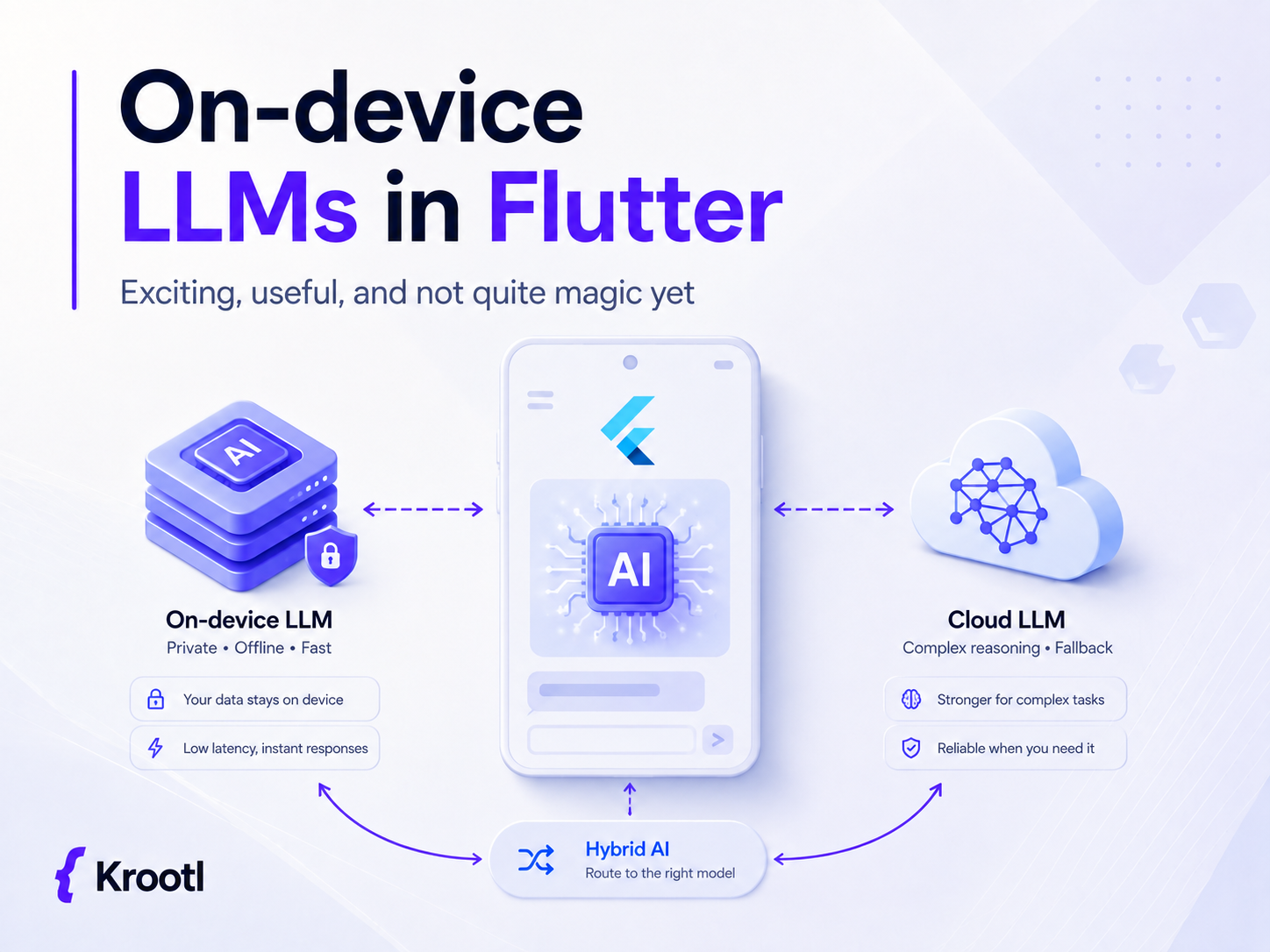
- Local classification and routing before deciding whether a cloud LLM is needed
- Hybrid assistants where the on-device model handles simple private tasks and the cloud model handles complex reasoning
That last point is important.
For many real products, the best architecture will not be “cloud LLM vs on-device LLM.” It will be both.
A local model can handle fast, private, offline, repetitive, or lower-risk tasks. A hosted model can still be used for heavier reasoning, more complex documents, broader knowledge, or cases where the local model confidence is low.
In other words: route the task to the right model.
2. Hardware
Generally speaking, it is possible to run small models on surprisingly modest devices. Something like Gemma 3 270M or another very small local model can run on hardware that would have sounded unrealistic for LLM inference not that long ago.
But performance degrades quickly.
And this is where a lot of product teams can get burned.
Your app is not running on one clean test device. It is running on old Android phones, mid-range Samsung devices, iPhones from several generations ago, tablets, desktops, different OS versions, different thermal conditions, different battery levels, and different storage situations.
A feature that feels fine on a developer’s flagship phone can feel painfully slow on a user’s budget Android device.
The safest way to ship on-device LLM features is to treat availability as device-dependent. Not every user should necessarily get the same model, the same backend, or the same feature set.
In practice, this may mean:
- Detecting device capability before enabling the feature
- Using remote config or feature flags
- Maintaining different model variants for different device classes
- Benchmarking CPU vs GPU execution per platform
- Testing on real low-end and mid-range Android devices, not only flagship phones and simulators
- Keeping model downloads optional
- Avoiding large background downloads unless the user clearly agreed
- Pausing or degrading the feature when the device is low on battery, overheating, or low on storage
- Having a cloud fallback when local inference is too slow or unavailable
- Measuring real-world latency, memory usage, crashes, and cancellation rates after release
This is not meant to sound scary. It is just what production mobile development already looks like.
On-device LLMs add a new performance-sensitive layer to the app. If we pretend every phone will behave like a recent flagship, the App Store and Google Play reviews will quickly remind us that they do not.
3. Interface
Chatbots are now a familiar concept, but on-device LLM computing is still new for many users.
Most users do not think in terms of local inference, model files, GPU acceleration, context windows, or NPUs. And they should not have to.
If your app needs to download a large model, the interface has to explain that in simple product language.
For example:
“This AI feature works privately on your device. It needs a one-time 2.8 GB download and may use more battery while running. We recommend downloading it over Wi-Fi.”
That is much better than throwing technical jargon at the user.
A good on-device AI interface should clearly explain:
- Why a model needs to be downloaded
- How large the download is
- Whether Wi-Fi is recommended
- Whether the feature works offline
- Whether the user’s data stays on the device
- Whether battery usage may increase while the model is running
- Whether the feature is unavailable on some devices
- What happens if the model is deleted, the download fails, or storage is low
- How the user can cancel or retry
- Whether there is a cloud fallback
This is also where product trust is created.
The privacy argument is strong, but it only works if the user understands it. “Your data stays on your device” is a meaningful product benefit. “Running Gemma E2B with GPU backend via LiteRT-LM” is not.
Good UX can make a 3 GB model download feel reasonable.
Bad UX can make it feel like the app is broken.
The practical approach: hybrid AI architecture
The most realistic near-term approach is probably hybrid.
Use on-device LLMs where they are genuinely better:
- private data
- offline workflows
- low-latency tasks
- simple summarization
- classification
- lightweight assistant flows
- cost-sensitive repeated operations
Use cloud LLMs where they are still better:
- complex reasoning
- large or unpredictable documents
- higher-quality generation
- knowledge-heavy tasks
- multi-step agentic workflows
- cases where reliability matters more than offline availability
And then build a routing layer between them.
The product should not care whether the answer came from Gemma running locally, Gemini in the cloud, OpenAI, Claude, or another provider. The product should care about latency, cost, privacy, quality, and reliability.
That is where the real engineering work is.
Not just “add AI.”
But decide which AI should handle which task, under which conditions, on which device, with which fallback.
Final thoughts
On-device LLMs are one of the most exciting directions in mobile and cross-platform development right now.
For Flutter teams specifically, LiteRT-LM and flutter_gemma make this space especially interesting because they bring local AI closer to the kind of cross-platform developer experience Flutter is already known for.
But it is not magic yet.
You still need to pick the right use case. You still need to test real hardware. You still need to design the download and onboarding flow properly. You still need to think about battery, storage, model size, backend selection, fallbacks, monitoring, and user trust.
The opportunity is real. The hype is also real.
The winning products will probably be the ones that do not try to blindly replace cloud LLMs with local models, but instead use on-device AI where it actually makes the product better.
At Krootl, we help product teams design, prototype, and ship AI-powered mobile and web applications with Flutter, Firebase, cloud LLMs, and now increasingly on-device AI.
If you are exploring whether an on-device LLM makes sense for your product, the best first step is not a full implementation.
It is a focused technical prototype: one use case, one or two target devices, clear performance expectations, and a decision on whether local, cloud, or hybrid AI architecture gives the best user experience.
Useful links
Flutter 3.44 announcement: https://blog.flutter.dev/whats-new-in-flutter-3-44-b0cc1ad3c527
flutter_gemma package: https://pub.dev/packages/flutter_gemma
Gemma models: https://deepmind.google/models/gemma/
LiteRT-LM GitHub: https://github.com/google-ai-edge/LiteRT-LM
LiteRT overview: https://ai.google.dev/edge/litert/overview